PDF to Flashcards: How to Make Study Cards That Work
Learn how to make PDF to Flashcards work for you: prep your file, check every card against the source, and review on a schedule.
Topics: pdf to flashcards, study flashcards, flashcards from notes, active recall, spaced review
You've got a biology PDF open, a test coming up, and plenty of highlighted sentences. To turn that PDF into flashcards, choose a manageable section, make questions from its key ideas, and check the answers against the original pages before studying. Generating cards is the quick part. Making sure they teach the right thing is the skill that matters.
Table of Contents
- Why flashcards from a PDF beat rereading
- Prepare your PDF and make the set step by step
- Checking each card against the source
- Building a Review Routine That Sticks
- Turning Test Mistakes Into New Cards
- Make Your First Set Before the Weekend
Why flashcards from a PDF beat rereading
A PDF becomes practice material when you turn its key ideas into questions you answer from memory. Check the source after you've tried, rather than keeping the answer in view.
Say you reread a 30-page biology chapter and highlight nearly everything. The wording starts to feel familiar, so you feel ready. Then a test asks you to explain why a cell needs energy, and the explanation won't come.
Recognizing a sentence isn't the same as recalling its meaning. Retrieval practice means trying to bring an answer to mind, then checking it and correcting any gaps.
A familiar-looking page tells you what you recognize. A closed-book question helps you find out what you can recall.
A meta-analysis summarized in the Retrieval Practice guide covered nearly 100 years of research, with 272 comparisons and 15,427 participants, and reported an average effect size of 0.70 standard deviations, with a 95% confidence interval from 0.63 to 0.78. That indicates a substantial average advantage over learning conditions without retrieval practice, not a percentage increase in grades.
The analysis didn't test PDF-to-flashcard software. It supports the study method, not any particular product.
Our guide to active recall learning explains how to practice this habit. Definitions, dates, formulas, and examples become useful prompts when you have to produce an answer, rather than recognize one.
Prepare your PDF and make the set step by step
Start with the file, not the generate button. A clear PDF gives you a better starting point than a scan with missing words or a chapter that mixes several unrelated topics.
Before uploading, make these checks:
- Selectable text: Can you select a sentence, copy it, and paste it into a notes app without scrambled words?
- Manageable scope: Does the file cover a focused topic, or a long stretch of the course?
- Visual content: Are important pages mostly diagrams, tables, graphs, or equations?
If you can't select text, the PDF may contain pictures of pages rather than readable text. Run optical character recognition, usually called OCR, in a PDF app such as Adobe Acrobat. Then copy a page into a notes file and compare it with the original.
OCR turns pictures of text into selectable words. It doesn't guarantee that those words are correct. Pay particular attention to scientific names, punctuation, and symbols.
Clean up the material before uploading
Use this table to spot a file problem before it becomes a bad card. Apply the preparation step to a study copy, keeping the original document unchanged.
| PDF feature | Problem it causes | Prep step |
|---|---|---|
| Scanned pages with no text layer | Words can be missing or misread | Run OCR, then copy a page to confirm the text is clean |
| Tables and charts | Rows and columns can shift when text is pulled out | Retype key values into a notes file or crop the page to the table |
| Formulas and equations | Exponents, subscripts, and symbols can break | Rewrite the formula in clean text and check every superscript |
| Slides with mostly images | Little text is available to build cards from | Add a short written summary or speaker notes first |
| Long textbook chapters, 100+ pages | Cards can become broad and generic | Split the file into 10 to 20 page sections by heading |
| Headers, footers, answer keys | Noise and spoilers can become cards | Remove them from the study copy or skip them when choosing a range |
Those page ranges are practical starting suggestions, not research-tested limits. Keep a complete explanation together even if it crosses your planned boundary. Splitting a process halfway through can remove the context needed to understand it.
For a diagram, write down what the labels and arrows mean. A picture of the water cycle needs more than a list of terms. Your notes should explain what changes during evaporation and what the arrow to condensation represents.
Upload only legitimate educational materials, such as textbooks, notes, worksheets, or presentations. Remove personal information that isn't needed for studying, and keep answer keys separate from the questions you want to practice.
Build a focused study set
You can write cards by hand, organize question-and-answer columns in a spreadsheet, or generate a draft from your file. In Knobee, our Study Sets can begin with a topic description, pasted notes, or an uploaded PDF, PowerPoint, or Word file.
Follow this sequence:
- Open the PDF and choose a focused section. For example, start with 10 to 20 pages around a chapter heading, keeping explanations and their examples together.
- Note your grade, subject, and curriculum. That might mean Next Generation Science Standards, or NGSS, for science, or Common Core for math.
- Upload the selected file or paste its cleaned text into Knobee.
- Set the subject and grade so the wording and depth match your course. Choose the supported curriculum that your class uses.
- Generate the set and read the first five cards as an initial quality check. Look for readable prompts, relevant answers, and signs that the right pages were used.
- Remove obvious duplicates. Keep separate cards when they test different skills, such as naming a process and explaining its cause.
- Give the set a useful name. For example, Biology Ch 4 pp 42–55 tells you where to return when an answer needs checking.
Grade settings matter because the same topic can require different vocabulary and depth. An introductory biology card might ask what a cell membrane does. An advanced card might ask how its structure affects the movement of substances.
Preparation rule: Keep the source specific enough that you can tell what belongs in the set and what doesn't.
A generator can organize material, but your class notes and assigned learning goals should determine what you need to learn. Don't keep an unfamiliar detail just because it appeared in the output.
Checking each card against the source
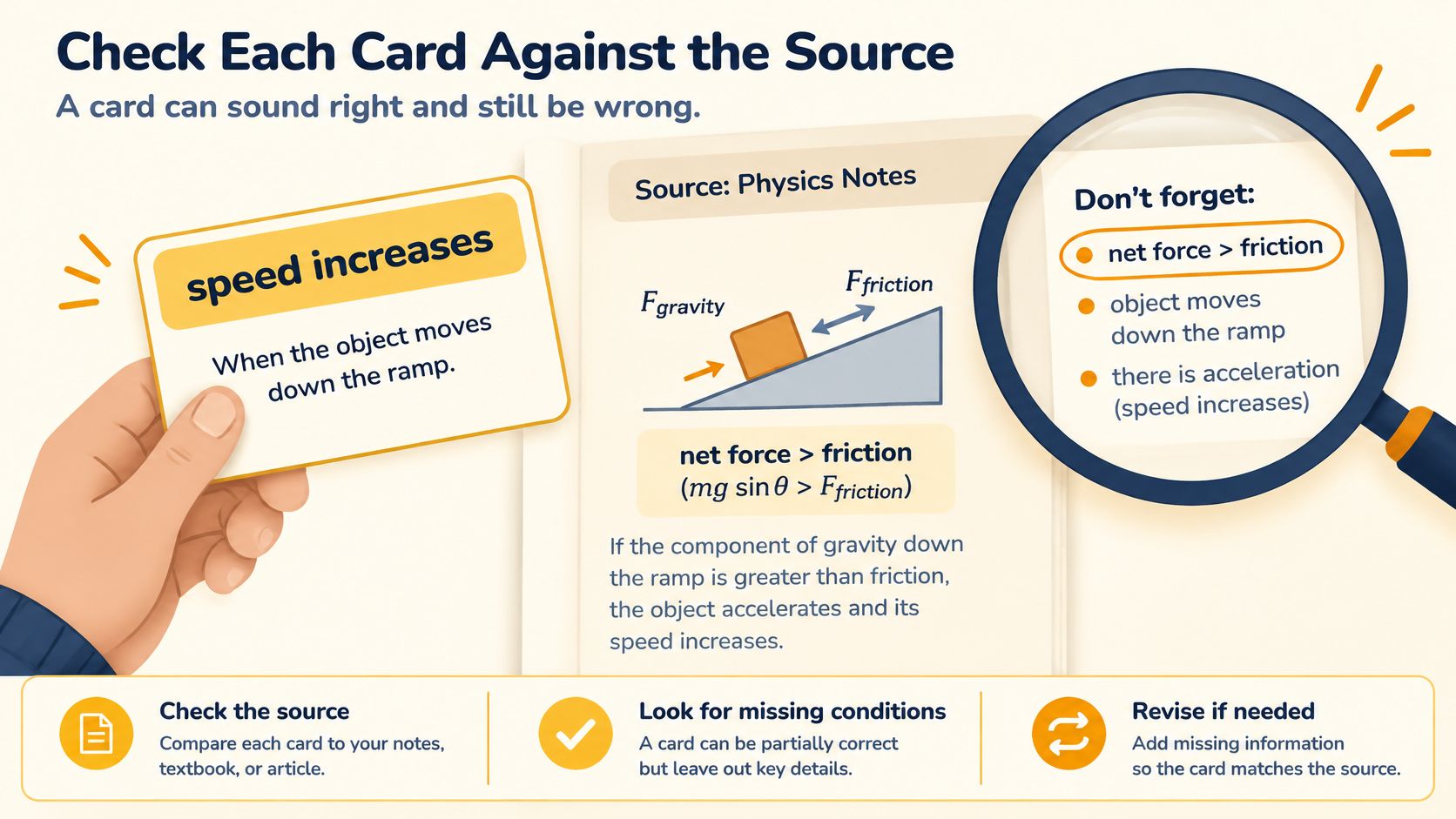
A generated card can sound confident and still be wrong. It might leave out a condition, combine separate ideas, or add an explanation that the PDF never gives.
Keep the original page beside the card while you check it. This illustration shows the comparison to make.
Check ten cards before studying
Use ten cards per set as a practical checking rule, not a guarantee of accuracy. Include cards from different parts of the document, especially those involving diagrams, formulas, or conditions. Edit or delete anything that fails, and investigate related cards if you find a pattern of errors.
| Check | Good sign | Red flag |
|---|---|---|
| Matches the source | You can find the answer on the cited page | The answer sounds right but you can't find it in the PDF |
| Keeps conditions | Units, assumptions, and “only when” clauses are included | A condition such as “at constant temperature” is dropped |
| One idea per card | The card tests a single fact or step | The card asks separate questions at once |
| Formula accuracy | Symbols, signs, and exponents match the page | A negative sign is missing or an exponent is wrong |
| Right depth | The detail matches your course level | It tests footnote trivia or an example your class never covered |
| Clear prompt | You know what a complete, focused answer requires | A vague prompt such as “Explain photosynthesis” gives no boundary |
Consider a physics card whose answer says that speed increases. Under what conditions? Even adding at constant acceleration isn't enough by itself: speed can decrease when acceleration acts opposite to motion. Preserve the source's full situation, including direction.
Other edits are more straightforward. Split a card asking for both a definition and an unrelated date. Replace a broad photosynthesis prompt with a focused question about the role of light energy. If a formula loses a negative sign, compare every symbol before keeping it.
In the Chegg Global Student Survey 2025, 53% of surveyed undergraduates who used generative AI for study reported concern about incorrect or inaccurate information. That's a concern reported by university students, not a measured error rate for high school flashcards.
More cards aren't automatically better. Keep page references in your own notes if the generated cards don't include them, and distinguish source facts from added explanations. No checking sample catches everything, so use teacher notes as your final classroom authority and ask about disagreements.
Building a Review Routine That Sticks
Spread your practice across separate sessions rather than repeating the same cards in a single sitting. A 2020 meta-analysis of spaced retrieval practice examined 29 studies and found an effect size of g = 0.74 for spaced over massed retrieval in an analyzed subset, but no statistically significant overall advantage for expanding intervals over uniform spacing.
That supports returning to material over time. It doesn't establish a universally best set of review days, and it doesn't show that a particular app guarantees better grades.
Use a starting schedule you can adjust
The timetable below is a practical suggestion, not a research-proven schedule. Move sessions to fit your lessons and test date, and give difficult material additional attention.
| When | Focus | Cards to review |
|---|---|---|
| Same day | Go through the whole set once | All new cards |
| Two days later | Retry the cards you missed | Missed cards only |
| Four days later | Mix missed and older cards | Missed cards plus about half of the rest |
| Seven days later | Check for gaps across the full set | All cards |
| Before a test | Put weak and unmastered cards first | Cards you haven't yet mastered |
Keep related material together so finding it doesn't become another task. In our Flashcards library, all parts of the same upload are grouped under the By Upload tab.
Use the card states to organize attention: Unseen means you haven't reviewed the card, Reviewed means you've seen its answer, and Mastered records a successful assessment. Don't treat having seen an answer as proof that you can explain it independently.
Respond to what you miss
Say you have a 40-card set and review it on day one. If several ideas are difficult, you might retry those missed cards on day two, earlier than the suggested timetable, and return to the full set before a test on day seven.
When you miss a card, identify the reason. Not knowing the term calls for a different response from misunderstanding the process. Reopen the explanation, work through an example, or ask your teacher before repeating an answer that still doesn't make sense.
For a tight deadline, our guide to memorizing material efficiently offers additional planning ideas. Keep the routine manageable enough that you'll return to it, rather than saving everything for a long session before the test.
Turning Test Mistakes Into New Cards
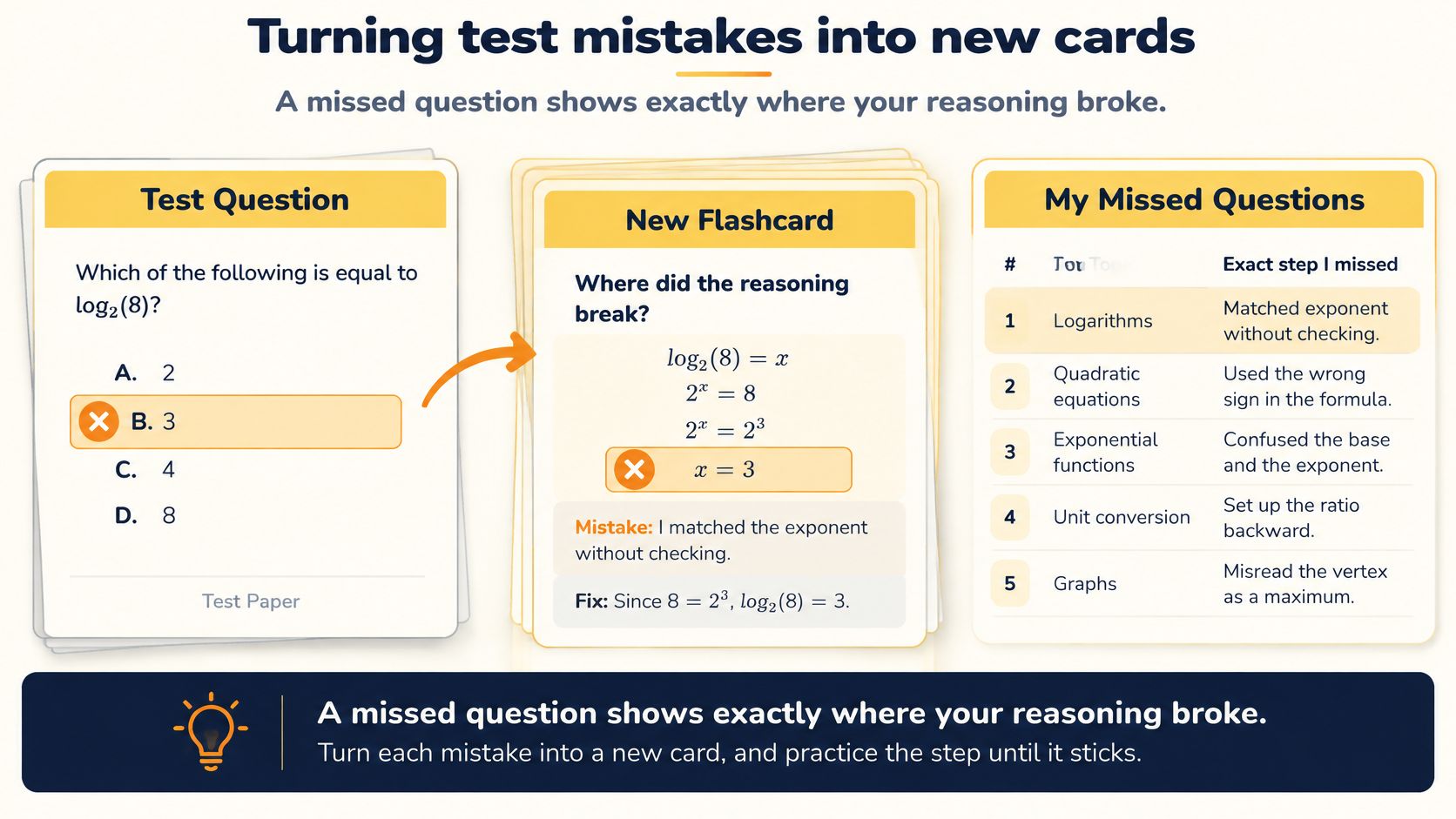
A missed test question gives you something a chapter heading can't: a specific place where your reasoning broke down. Use the marked work to decide what the next practice question should test.
This illustration shows how to turn that mistake into a focused prompt.
Ask for the missing step
Work from the mistake toward a new card:
- List the question you missed and locate the teacher's correction.
- Write down the step where your work went wrong.
- Make a prompt that asks for the correct decision or step, not just the original final answer.
- Test the idea with a different example.
For algebra, suppose you lost a negative sign while distributing. A useful card asks what happens to a negative term inside parentheses when it's multiplied by a negative factor. The answer should explain that the product is positive, with a checked example on the back.
That's more useful than memorizing the answer to the test problem. You're practicing a decision you'll need again when the numbers change.
Review automated feedback too
With our Test Analyzer, you can upload a photo or PDF of a graded test. Kno reads each question, identifies the likely error, explains what went wrong, coaches you through it in chat, and generates flashcards targeting your weak spots.
Review that analysis yourself and, where appropriate, check it with your teacher. An unclear handwritten sign or missing working can affect the interpretation.
This video offers a walkthrough of the study workflow.
Watch the Knobee study workflow video
If another assessment is close, use these targeted cards alongside a realistic plan for studying for a quiz the night before. A small set built around real mistakes can be more useful than a long generic set that never tests your difficult steps.
Make Your First Set Before the Weekend
Choose material you need for this week's lessons. You don't need to convert your whole textbook, and you don't need a perfect set before you begin.
Make a manageable start:
- Choose a PDF section. Pick a topic you've covered in class and keep the relevant explanation and examples together.
- Make a study set. Use the preparation steps to produce focused questions rather than a collection of copied sentences.
- Check ten cards. Compare their answers with the original pages, correct problems, and set your first review session.
We can build the set from your PDF. You can also paste notes, upload a PPTX file, or describe a unit topic when that better matches the material you have.
Measure progress by answering: Feeling familiar with a card isn't the same as demonstrating that you know it.
In Knobee, a flashcard can only be marked Mastered after you answer its corresponding quiz question correctly or score 80% or higher on a Mastery Check session. Treat that status as useful study feedback, not a reason to ignore future confusion.
Start with a set you can trust and improve it as you learn. Recall the answer first, check it against the source, and return to it on schedule.
Knobee AI turns your PDFs and notes into flashcards, quizzes, and guided practice you can check against your course materials. Visit Knobee AI with a focused PDF section, create your first set, and verify ten cards before you begin reviewing.